Tesla Voice Commands - Quick Reference Guide
Published on 31st December 2025 by Simon Fearby
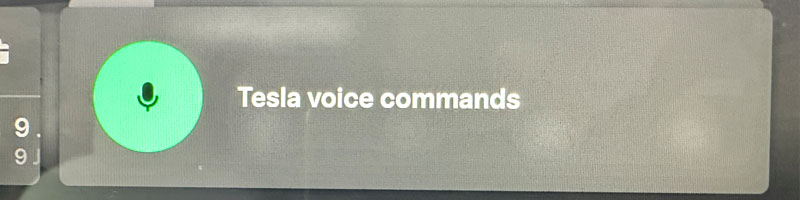
Tesla voice commands are one of the most powerful - and most overlooked - features of Tesla cars. They aren’t based on rigid phrases or menus, but on continuously refined software that interprets natural language and intent, improving quietly with each update. Many useful commands exist without ever being documented, which means most owners only scratch the surface. This quick reference guide is designed to fix that: a practical, at-a-glance list that helps you learn what’s possible, build the habit of using voice control, and get more out of the car without taking your hands or attention off the road.
Here is Tesla's Official Voice Command List.
Index: Voice Commands
- Climate & Comfort
- Charging & Energy
- Navigation & Places
- Media (Music, Radio, Streaming)
- Phone, Calls & Messages
- Wipers, Lights & Visibility
- Windows, Mirrors & Locks
- Trunk, Frunk & Glovebox
- Camera, Dashcam & Safety
- Driving & Assistance (Availability Varies)
- Display, Controls & Convenience
- Fun / Easter Eggs (If Enabled)
To use a voice command simply press the right scroll wheel and say the command. You can see words being detected and typed into the info card on your screen.
Climate & Comfort
- “Set temperature to 22 degrees”
- “Turn on climate” - Air Conditioner
- “Turn off climate” - Air Conditioner
- “Enable life support” - Air Conditioner
- “Disable life support” - Air Conditioner
- “Set fan speed to 5” - Set Air Conditioner Fan Speed
- “Turn on A/C”
- “Turn off A/C”
- “Turn on Auto”
- “Turn off Auto”
- “Direct air to my face”
- “Direct air to my feet”
- “Turn on recirculation”
- “Turn off recirculation”
- “Defrost windshield”
- “Turn on rear defrost”
- “Turn off defrost”
- “Turn on seat heater”
- “Set driver seat heater to 2”
- “Set passenger seat heater to 3”
- “Turn off seat heaters”
- “Turn on steering wheel heater”
- “Turn off steering wheel heater”
- “Turn on Dog Mode”
- “Turn on Camp Mode”
- “Turn on Keep Climate On”
- “Turn on Bioweapon Defense Mode”
- “Make it warmer”
- “Set the driver’s seat warmer to...”
- “Decrease fan speed...”
- “I’m cold” - Air Conditioner will get warmer by 2c
- “I’m hot” - Air Conditioner will get cooler by 2c
- “My feet are cold”
- “My feet are hot”
[Top]
Charging & Energy
- “Open charge port”
- “Close charge port”
- “Set charge level to 60 percent”
- “Set charge limit to 80 percent”
- “Charge to 90 percent”
- “Limit charging to 70 percent”
- “Start charging”
- “Stop charging”
- “What’s my battery percentage?”
- “How much range do I have?”
- “Show energy graph”
- “Show Charging Screen”
- “Hide Charging Screen”
- “Display Superchargers
- “Display Destination Chargers”
- “Mute voice guidance”
[Top]
Navigation & Places
- “Navigate home”
- “Navigate to work”
- “Navigate to 123 George Street, Sydney”
- “Go Home/Work”
- “Take me to the nearest Supercharger”
- “Find chargers nearby”
- “Find coffee nearby”
- “Find parking nearby”
- “Find a hospital nearby”
- “Cancel navigation”
- “Navigate to [contact name]”
- “Zoom In”
- “Zoom Out”
- “Turn on satellite mode”
- “Turn on traffic mode”
- “Turn off satellite mode”
- “Turn off traffic mode”
- “Stop navigation”
- “Display Superchargers
- “Display Destination Chargers”
- “Center the Map”
[Top]
Media (Music, Radio, Streaming)
- “Play Spotify”
- “Play Apple Music”
- “Play Triple J”
- “Play ABC News Radio”
- “Play AC/DC”
- “Play my liked songs”
- “Play podcasts”
- “Search for Metallica”
- “Next track”
- “Previous track”
- “Pause”
- “Resume”
- “Turn volume up”
- “Turn volume down”
- “Set volume to 5”
- “Turn on the Radio”
- “Mute”
- “Unmute”
- “Open music”
- “Open Netflix
- “Open YouTube.”
[Top]
Phone, Calls & Messages
- “Call John”
- “Call Jenny mobile”
- “Redial”
- “Answer”
- “Hang up”
- “Read my messages”
- “Send a message to [name]”
- “Text [name] I’m on my way”
- “Call 0456 123 456”
[Top]
Wipers, Lights & Visibility
- “Turn on wipers”
- “Turn off wipers”
- “Set wipers to Auto”
- “Set wipers to speed 1”
- “Set wipers to speed 3”
- “Turn on headlights”
- “Turn off headlights”
- “Set headlights to Auto”
- “Turn on high beams”
- “Turn off high beams”
- “Turn on fog lights”
- “Turn off fog lights”
[Top]
Windows, Mirrors & Locks
- “Open driver window”
- “Close driver window”
- “Open passenger window”
- “Close passenger window”
- “Vent the windows”
- “Close all windows”
- “Fold mirrors”
- “Unfold mirrors”
- “Lock the doors”
- “Unlock the doors”
[Top]
Trunk, Frunk & Glovebox
- “Open the trunk”
- “Close the trunk”
- “Open the frunk”
- “Close the frunk”
- “Open the boot”
- “Close the boot”
- “Open the glovebox”
[Top]
Camera, Dashcam & Safety
- “Open camera”
- “Show rear camera”
- “Show side cameras”
- “Save dashcam clip”
- “Record”
- “Stop recording”
- “Turn On Child Lock”
- “Turn Off Child Lock”
[Top]
Driving & Assistance (Availability Varies)
- “Set following distance to 3”
- “Set cruise speed to 100”
- “Cancel”
- “Enable Autosteer”
- “Disable Autosteer”
Display, Controls & Convenience
- “Open Glovebox”
- “Show/Open Bluetooth”
- “Show/Open Wi-Fi”
- “Show/Open Media”
- “Show/Open Phone”
- “Show/Open Map”
- “Show/Open Weather”
- “Show/Open Charging Screen”
- “Show/Open ... - Show any screen by name
- “Hide Bluetooth”
- “Hide Wi-Fi”
- “Hide Media”
- “Hide Phone”
- “Hide Charging Screen”
- “Hide Map”
- “Hide Weather”
- “Turn on Sentry Mode” / "Activate sentry mode”
- “Keep Summer Safe” - Risk And Morty themes Sentry Mode
- “Turn off Sentry Mode”
- “Open settings”
- “Increase screen brightness”
- “Decrease screen brightness”
- “Set screen brightness to 50 percent”
- “Open browser/phone/camera/lock settings...”
- “Search Google for the weather...”
- “Go to tesla.com...” - Open the Browser and navigate to tesla.com
[Top]
Misc, Fun / Easter Eggs (If Enabled)
- “Open the owners manual”
- “Show Release Notes”
- “Show Tyre Pressure”
- “Show Odometer”
- “Open Driving Menu” - Open Main Control Screen
- “Open Service Setting” - Open Service Screen
- “Open Autopilot Setting” - Open Autopiot Screen
- “Open Display Setting” - Open Dispaly Screen
- “Pump up the Jam 7Turn the sound to that level
- “Make it fart”
- “Open entertainment”
- “Ho ho ho” - Santa Mode
- “Turn On Santa Mode”
- “Turn Off Santa Mode”
- “Turn On Tron Mode”
- “Turn Off Tron Mode”
- “Engage maximum warp”
- “Open butt hole” - Open Charge Port
- “Warm up my butt” - Turn On Heated Seats
- “Open Flux Capacitor” - Open Charge Port
- “The View from Space” - Sattelite off, Traffic visualisatio on
- “Bug Report” - Send a spoken report to Tesla
- “Error Report” - Send a spoken report to Tesla
[Top]
- “Open charge port”
- “Close charge port”
- “Set charge level to 60 percent”
- “Set charge limit to 80 percent”
- “Charge to 90 percent”
- “Limit charging to 70 percent”
- “Start charging”
- “Stop charging”
- “What’s my battery percentage?”
- “How much range do I have?”
- “Show energy graph”
- “Show Charging Screen”
- “Hide Charging Screen”
- “Display Superchargers
- “Display Destination Chargers”
- “Mute voice guidance”
- [Top]
Navigation & Places
- “Navigate home”
- “Navigate to work”
- “Navigate to 123 George Street, Sydney”
- “Go Home/Work”
- “Take me to the nearest Supercharger”
- “Find chargers nearby”
- “Find coffee nearby”
- “Find parking nearby”
- “Find a hospital nearby”
- “Cancel navigation”
- “Navigate to [contact name]”
- “Zoom In”
- “Zoom Out”
- “Turn on satellite mode”
- “Turn on traffic mode”
- “Turn off satellite mode”
- “Turn off traffic mode”
- “Stop navigation”
- “Display Superchargers
- “Display Destination Chargers”
- “Center the Map”
[Top]
Media (Music, Radio, Streaming)
- “Play Spotify”
- “Play Apple Music”
- “Play Triple J”
- “Play ABC News Radio”
- “Play AC/DC”
- “Play my liked songs”
- “Play podcasts”
- “Search for Metallica”
- “Next track”
- “Previous track”
- “Pause”
- “Resume”
- “Turn volume up”
- “Turn volume down”
- “Set volume to 5”
- “Turn on the Radio”
- “Mute”
- “Unmute”
- “Open music”
- “Open Netflix
- “Open YouTube.”
[Top]
Phone, Calls & Messages
- “Call John”
- “Call Jenny mobile”
- “Redial”
- “Answer”
- “Hang up”
- “Read my messages”
- “Send a message to [name]”
- “Text [name] I’m on my way”
- “Call 0456 123 456”
[Top]
Wipers, Lights & Visibility
- “Turn on wipers”
- “Turn off wipers”
- “Set wipers to Auto”
- “Set wipers to speed 1”
- “Set wipers to speed 3”
- “Turn on headlights”
- “Turn off headlights”
- “Set headlights to Auto”
- “Turn on high beams”
- “Turn off high beams”
- “Turn on fog lights”
- “Turn off fog lights”
[Top]
Windows, Mirrors & Locks
- “Open driver window”
- “Close driver window”
- “Open passenger window”
- “Close passenger window”
- “Vent the windows”
- “Close all windows”
- “Fold mirrors”
- “Unfold mirrors”
- “Lock the doors”
- “Unlock the doors”
[Top]
Trunk, Frunk & Glovebox
- “Open the trunk”
- “Close the trunk”
- “Open the frunk”
- “Close the frunk”
- “Open the boot”
- “Close the boot”
- “Open the glovebox”
[Top]
Camera, Dashcam & Safety
- “Open camera”
- “Show rear camera”
- “Show side cameras”
- “Save dashcam clip”
- “Record”
- “Stop recording”
- “Turn On Child Lock”
- “Turn Off Child Lock”
[Top]
Driving & Assistance (Availability Varies)
- “Set following distance to 3”
- “Set cruise speed to 100”
- “Cancel”
- “Enable Autosteer”
- “Disable Autosteer”
Display, Controls & Convenience
- “Open Glovebox”
- “Show/Open Bluetooth”
- “Show/Open Wi-Fi”
- “Show/Open Media”
- “Show/Open Phone”
- “Show/Open Map”
- “Show/Open Weather”
- “Show/Open Charging Screen”
- “Show/Open ... - Show any screen by name
- “Hide Bluetooth”
- “Hide Wi-Fi”
- “Hide Media”
- “Hide Phone”
- “Hide Charging Screen”
- “Hide Map”
- “Hide Weather”
- “Turn on Sentry Mode” / "Activate sentry mode”
- “Keep Summer Safe” - Risk And Morty themes Sentry Mode
- “Turn off Sentry Mode”
- “Open settings”
- “Increase screen brightness”
- “Decrease screen brightness”
- “Set screen brightness to 50 percent”
- “Open browser/phone/camera/lock settings...”
- “Search Google for the weather...”
- “Go to tesla.com...” - Open the Browser and navigate to tesla.com
[Top]
Misc, Fun / Easter Eggs (If Enabled)
- “Open the owners manual”
- “Show Release Notes”
- “Show Tyre Pressure”
- “Show Odometer”
- “Open Driving Menu” - Open Main Control Screen
- “Open Service Setting” - Open Service Screen
- “Open Autopilot Setting” - Open Autopiot Screen
- “Open Display Setting” - Open Dispaly Screen
- “Pump up the Jam 7Turn the sound to that level
- “Make it fart”
- “Open entertainment”
- “Ho ho ho” - Santa Mode
- “Turn On Santa Mode”
- “Turn Off Santa Mode”
- “Turn On Tron Mode”
- “Turn Off Tron Mode”
- “Engage maximum warp”
- “Open butt hole” - Open Charge Port
- “Warm up my butt” - Turn On Heated Seats
- “Open Flux Capacitor” - Open Charge Port
- “The View from Space” - Sattelite off, Traffic visualisatio on
- “Bug Report” - Send a spoken report to Tesla
- “Error Report” - Send a spoken report to Tesla
[Top]
- “Play Spotify”
- “Play Apple Music”
- “Play Triple J”
- “Play ABC News Radio”
- “Play AC/DC”
- “Play my liked songs”
- “Play podcasts”
- “Search for Metallica”
- “Next track”
- “Previous track”
- “Pause”
- “Resume”
- “Turn volume up”
- “Turn volume down”
- “Set volume to 5”
- “Turn on the Radio”
- “Mute”
- “Unmute”
- “Open music”
- “Open Netflix
- “Open YouTube.”
- [Top]
Phone, Calls & Messages
- “Call John”
- “Call Jenny mobile”
- “Redial”
- “Answer”
- “Hang up”
- “Read my messages”
- “Send a message to [name]”
- “Text [name] I’m on my way”
- “Call 0456 123 456”
[Top]
Wipers, Lights & Visibility
- “Turn on wipers”
- “Turn off wipers”
- “Set wipers to Auto”
- “Set wipers to speed 1”
- “Set wipers to speed 3”
- “Turn on headlights”
- “Turn off headlights”
- “Set headlights to Auto”
- “Turn on high beams”
- “Turn off high beams”
- “Turn on fog lights”
- “Turn off fog lights”
[Top]
Windows, Mirrors & Locks
- “Open driver window”
- “Close driver window”
- “Open passenger window”
- “Close passenger window”
- “Vent the windows”
- “Close all windows”
- “Fold mirrors”
- “Unfold mirrors”
- “Lock the doors”
- “Unlock the doors”
[Top]
Trunk, Frunk & Glovebox
- “Open the trunk”
- “Close the trunk”
- “Open the frunk”
- “Close the frunk”
- “Open the boot”
- “Close the boot”
- “Open the glovebox”
[Top]
Camera, Dashcam & Safety
- “Open camera”
- “Show rear camera”
- “Show side cameras”
- “Save dashcam clip”
- “Record”
- “Stop recording”
- “Turn On Child Lock”
- “Turn Off Child Lock”
[Top]
Driving & Assistance (Availability Varies)
- “Set following distance to 3”
- “Set cruise speed to 100”
- “Cancel”
- “Enable Autosteer”
- “Disable Autosteer”
Display, Controls & Convenience
- “Open Glovebox”
- “Show/Open Bluetooth”
- “Show/Open Wi-Fi”
- “Show/Open Media”
- “Show/Open Phone”
- “Show/Open Map”
- “Show/Open Weather”
- “Show/Open Charging Screen”
- “Show/Open ... - Show any screen by name
- “Hide Bluetooth”
- “Hide Wi-Fi”
- “Hide Media”
- “Hide Phone”
- “Hide Charging Screen”
- “Hide Map”
- “Hide Weather”
- “Turn on Sentry Mode” / "Activate sentry mode”
- “Keep Summer Safe” - Risk And Morty themes Sentry Mode
- “Turn off Sentry Mode”
- “Open settings”
- “Increase screen brightness”
- “Decrease screen brightness”
- “Set screen brightness to 50 percent”
- “Open browser/phone/camera/lock settings...”
- “Search Google for the weather...”
- “Go to tesla.com...” - Open the Browser and navigate to tesla.com
[Top]
Misc, Fun / Easter Eggs (If Enabled)
- “Open the owners manual”
- “Show Release Notes”
- “Show Tyre Pressure”
- “Show Odometer”
- “Open Driving Menu” - Open Main Control Screen
- “Open Service Setting” - Open Service Screen
- “Open Autopilot Setting” - Open Autopiot Screen
- “Open Display Setting” - Open Dispaly Screen
- “Pump up the Jam 7Turn the sound to that level
- “Make it fart”
- “Open entertainment”
- “Ho ho ho” - Santa Mode
- “Turn On Santa Mode”
- “Turn Off Santa Mode”
- “Turn On Tron Mode”
- “Turn Off Tron Mode”
- “Engage maximum warp”
- “Open butt hole” - Open Charge Port
- “Warm up my butt” - Turn On Heated Seats
- “Open Flux Capacitor” - Open Charge Port
- “The View from Space” - Sattelite off, Traffic visualisatio on
- “Bug Report” - Send a spoken report to Tesla
- “Error Report” - Send a spoken report to Tesla
[Top]
- “Turn on wipers”
- “Turn off wipers”
- “Set wipers to Auto”
- “Set wipers to speed 1”
- “Set wipers to speed 3”
- “Turn on headlights”
- “Turn off headlights”
- “Set headlights to Auto”
- “Turn on high beams”
- “Turn off high beams”
- “Turn on fog lights”
- “Turn off fog lights”
- [Top]
Windows, Mirrors & Locks
- “Open driver window”
- “Close driver window”
- “Open passenger window”
- “Close passenger window”
- “Vent the windows”
- “Close all windows”
- “Fold mirrors”
- “Unfold mirrors”
- “Lock the doors”
- “Unlock the doors”
[Top]
Trunk, Frunk & Glovebox
- “Open the trunk”
- “Close the trunk”
- “Open the frunk”
- “Close the frunk”
- “Open the boot”
- “Close the boot”
- “Open the glovebox”
[Top]
Camera, Dashcam & Safety
- “Open camera”
- “Show rear camera”
- “Show side cameras”
- “Save dashcam clip”
- “Record”
- “Stop recording”
- “Turn On Child Lock”
- “Turn Off Child Lock”
[Top]
Driving & Assistance (Availability Varies)
- “Set following distance to 3”
- “Set cruise speed to 100”
- “Cancel”
- “Enable Autosteer”
- “Disable Autosteer”
Display, Controls & Convenience
- “Open Glovebox”
- “Show/Open Bluetooth”
- “Show/Open Wi-Fi”
- “Show/Open Media”
- “Show/Open Phone”
- “Show/Open Map”
- “Show/Open Weather”
- “Show/Open Charging Screen”
- “Show/Open ... - Show any screen by name
- “Hide Bluetooth”
- “Hide Wi-Fi”
- “Hide Media”
- “Hide Phone”
- “Hide Charging Screen”
- “Hide Map”
- “Hide Weather”
- “Turn on Sentry Mode” / "Activate sentry mode”
- “Keep Summer Safe” - Risk And Morty themes Sentry Mode
- “Turn off Sentry Mode”
- “Open settings”
- “Increase screen brightness”
- “Decrease screen brightness”
- “Set screen brightness to 50 percent”
- “Open browser/phone/camera/lock settings...”
- “Search Google for the weather...”
- “Go to tesla.com...” - Open the Browser and navigate to tesla.com
[Top]
Misc, Fun / Easter Eggs (If Enabled)
- “Open the owners manual”
- “Show Release Notes”
- “Show Tyre Pressure”
- “Show Odometer”
- “Open Driving Menu” - Open Main Control Screen
- “Open Service Setting” - Open Service Screen
- “Open Autopilot Setting” - Open Autopiot Screen
- “Open Display Setting” - Open Dispaly Screen
- “Pump up the Jam 7Turn the sound to that level
- “Make it fart”
- “Open entertainment”
- “Ho ho ho” - Santa Mode
- “Turn On Santa Mode”
- “Turn Off Santa Mode”
- “Turn On Tron Mode”
- “Turn Off Tron Mode”
- “Engage maximum warp”
- “Open butt hole” - Open Charge Port
- “Warm up my butt” - Turn On Heated Seats
- “Open Flux Capacitor” - Open Charge Port
- “The View from Space” - Sattelite off, Traffic visualisatio on
- “Bug Report” - Send a spoken report to Tesla
- “Error Report” - Send a spoken report to Tesla
[Top]
- “Open the trunk”
- “Close the trunk”
- “Open the frunk”
- “Close the frunk”
- “Open the boot”
- “Close the boot”
- “Open the glovebox”
- [Top]
Camera, Dashcam & Safety
- “Open camera”
- “Show rear camera”
- “Show side cameras”
- “Save dashcam clip”
- “Record”
- “Stop recording”
- “Turn On Child Lock”
- “Turn Off Child Lock”
[Top]
Driving & Assistance (Availability Varies)
- “Set following distance to 3”
- “Set cruise speed to 100”
- “Cancel”
- “Enable Autosteer”
- “Disable Autosteer”
Display, Controls & Convenience
- “Open Glovebox”
- “Show/Open Bluetooth”
- “Show/Open Wi-Fi”
- “Show/Open Media”
- “Show/Open Phone”
- “Show/Open Map”
- “Show/Open Weather”
- “Show/Open Charging Screen”
- “Show/Open ... - Show any screen by name
- “Hide Bluetooth”
- “Hide Wi-Fi”
- “Hide Media”
- “Hide Phone”
- “Hide Charging Screen”
- “Hide Map”
- “Hide Weather”
- “Turn on Sentry Mode” / "Activate sentry mode”
- “Keep Summer Safe” - Risk And Morty themes Sentry Mode
- “Turn off Sentry Mode”
- “Open settings”
- “Increase screen brightness”
- “Decrease screen brightness”
- “Set screen brightness to 50 percent”
- “Open browser/phone/camera/lock settings...”
- “Search Google for the weather...”
- “Go to tesla.com...” - Open the Browser and navigate to tesla.com
[Top]
Misc, Fun / Easter Eggs (If Enabled)
- “Open the owners manual”
- “Show Release Notes”
- “Show Tyre Pressure”
- “Show Odometer”
- “Open Driving Menu” - Open Main Control Screen
- “Open Service Setting” - Open Service Screen
- “Open Autopilot Setting” - Open Autopiot Screen
- “Open Display Setting” - Open Dispaly Screen
- “Pump up the Jam 7Turn the sound to that level
- “Make it fart”
- “Open entertainment”
- “Ho ho ho” - Santa Mode
- “Turn On Santa Mode”
- “Turn Off Santa Mode”
- “Turn On Tron Mode”
- “Turn Off Tron Mode”
- “Engage maximum warp”
- “Open butt hole” - Open Charge Port
- “Warm up my butt” - Turn On Heated Seats
- “Open Flux Capacitor” - Open Charge Port
- “The View from Space” - Sattelite off, Traffic visualisatio on
- “Bug Report” - Send a spoken report to Tesla
- “Error Report” - Send a spoken report to Tesla
[Top]
- “Set following distance to 3”
- “Set cruise speed to 100”
- “Cancel”
- “Enable Autosteer”
- “Disable Autosteer”
Display, Controls & Convenience
- “Open Glovebox”
- “Show/Open Bluetooth”
- “Show/Open Wi-Fi”
- “Show/Open Media”
- “Show/Open Phone”
- “Show/Open Map”
- “Show/Open Weather”
- “Show/Open Charging Screen”
- “Show/Open ... - Show any screen by name
- “Hide Bluetooth”
- “Hide Wi-Fi”
- “Hide Media”
- “Hide Phone”
- “Hide Charging Screen”
- “Hide Map”
- “Hide Weather”
- “Turn on Sentry Mode” / "Activate sentry mode”
- “Keep Summer Safe” - Risk And Morty themes Sentry Mode
- “Turn off Sentry Mode”
- “Open settings”
- “Increase screen brightness”
- “Decrease screen brightness”
- “Set screen brightness to 50 percent”
- “Open browser/phone/camera/lock settings...”
- “Search Google for the weather...”
- “Go to tesla.com...” - Open the Browser and navigate to tesla.com
[Top]
Misc, Fun / Easter Eggs (If Enabled)
- “Open the owners manual”
- “Show Release Notes”
- “Show Tyre Pressure”
- “Show Odometer”
- “Open Driving Menu” - Open Main Control Screen
- “Open Service Setting” - Open Service Screen
- “Open Autopilot Setting” - Open Autopiot Screen
- “Open Display Setting” - Open Dispaly Screen
- “Pump up the Jam 7Turn the sound to that level
- “Make it fart”
- “Open entertainment”
- “Ho ho ho” - Santa Mode
- “Turn On Santa Mode”
- “Turn Off Santa Mode”
- “Turn On Tron Mode”
- “Turn Off Tron Mode”
- “Engage maximum warp”
- “Open butt hole” - Open Charge Port
- “Warm up my butt” - Turn On Heated Seats
- “Open Flux Capacitor” - Open Charge Port
- “The View from Space” - Sattelite off, Traffic visualisatio on
- “Bug Report” - Send a spoken report to Tesla
- “Error Report” - Send a spoken report to Tesla
[Top]
- “Open the owners manual”
- “Show Release Notes”
- “Show Tyre Pressure”
- “Show Odometer”
- “Open Driving Menu” - Open Main Control Screen
- “Open Service Setting” - Open Service Screen
- “Open Autopilot Setting” - Open Autopiot Screen
- “Open Display Setting” - Open Dispaly Screen
- “Pump up the Jam 7Turn the sound to that level
- “Make it fart”
- “Open entertainment”
- “Ho ho ho” - Santa Mode
- “Turn On Santa Mode”
- “Turn Off Santa Mode”
- “Turn On Tron Mode”
- “Turn Off Tron Mode”
- “Engage maximum warp”
- “Open butt hole” - Open Charge Port
- “Warm up my butt” - Turn On Heated Seats
- “Open Flux Capacitor” - Open Charge Port
- “The View from Space” - Sattelite off, Traffic visualisatio on
- “Bug Report” - Send a spoken report to Tesla
- “Error Report” - Send a spoken report to Tesla
- [Top]
New commands are added over time via OTA updates. Do try ramdom commands to see if they work.